
A tour of the pane
/vibesenpai:insights opens a pane beside the chat. This page walks through what each part of
it shows and what each button does.
Opening the pane spends nothing. It shows what two background jobs have already worked out:
- The history pass runs the free checks over your sessions, at most every 10 minutes.
- The judge is what does the model reads, after a turn ends.
If Claude Code cannot place a pane, the command prints a text version instead.
The first time it opens, it says Reading your history with a seconds counter, and
The free checks come first. Model reads begin when this turn ends.
The header

- How much has been read, as
12/40 sessions read, or a progress bar while the model reads are catching up. - When it last updated, as
updated 3m ago, with ↻ (orr) to refresh. An open pane also checks for new results every 30 seconds and after each turn. - A failing job, if there is one, in one line:
The history pass is retrying: <reason>orThe judge is held: <reason>. Held means the model reads stopped after 3 failed paid calls in a row; they stay stopped until you run/vibesenpai:judge on. - Three tabs: Findings, Fixes, Health.
⇥moves between buttons;⏎presses one.
Findings tab
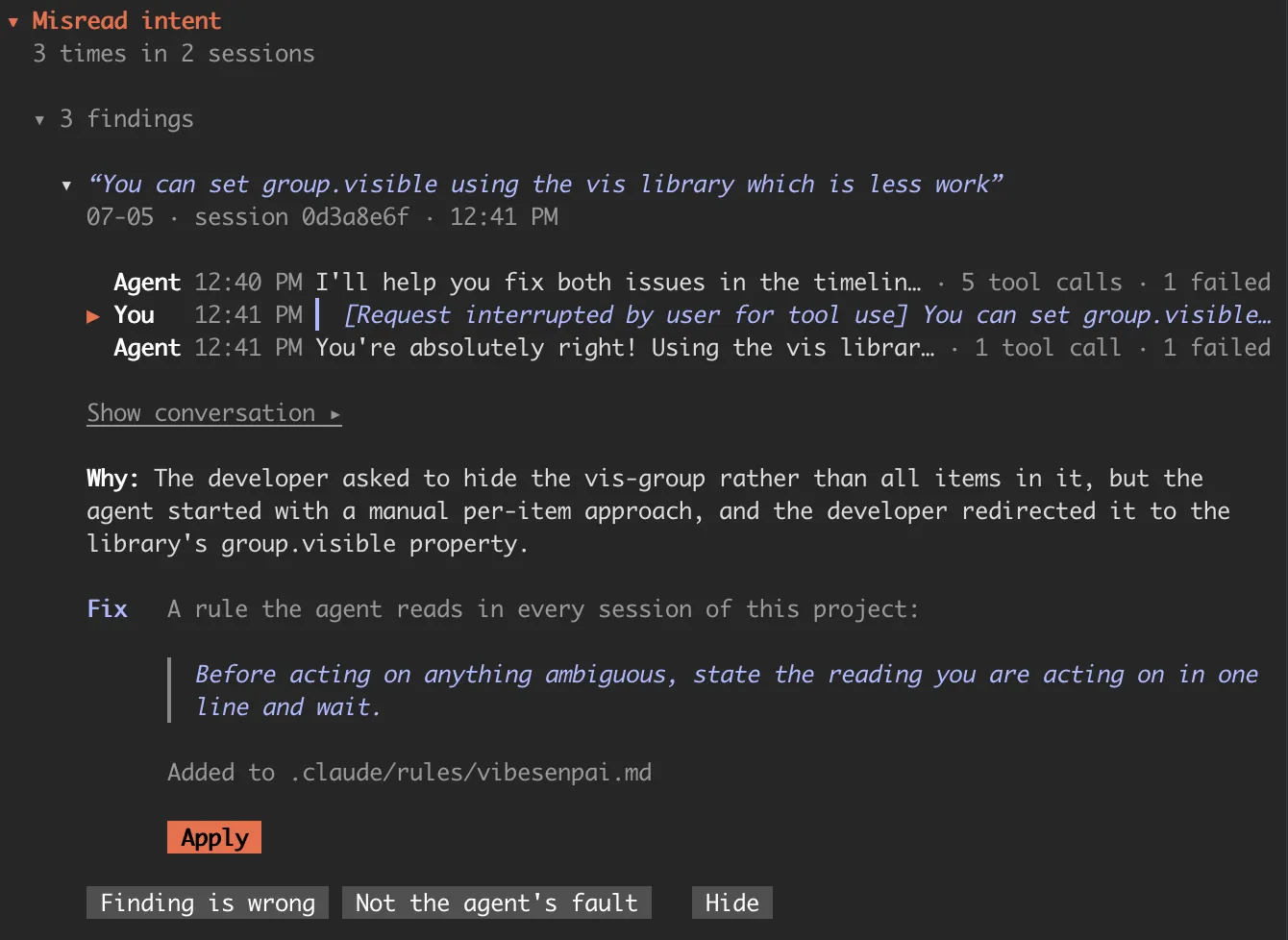
From top to bottom:
- Model reads progress. Until the model reads have found anything, a card shows how far
they have got (
N of M) and what happens next, for exampleBegins when this turn ends.orToday's limit is reached; it continues tomorrow.After the first model finding, it becomes the progress bar in the header. - New since you last looked. Up to three findings that arrived since you last opened the pane.
- What went wrong, by kind. One block per kind of finding, most frequent first, each with
N times in M sessions. Inside,▸ N findingslists them three at a time. The kind’s fix, if it has one, is below the list. - Cache rebuilds. When the prompt cache was thrown away and written again from scratch:
N times · N tokens written again. Opened, it lists the three largest. (Cache rebuilds) - Open full report writes and opens the HTML report. Hide all hides every finding and takes them out of the counts.
When nothing has been flagged, the tab says Nothing flagged in N sessions read. That is a
result, not an unfinished pass.
A row
A row’s headline is your own words, in italics: your reaction if the finding quotes you, otherwise the request the agent was answering. Only when neither exists does it show the agent’s words or the file involved, and those are never styled as yours.
Under the headline: any secondary kinds, shown as also overreach, then the day, the session,
and the time of the first cited turn.
An open finding
Press a row to open it. The pane reads the conversation around the cited turns from the
transcript and shows each message on one line: You or Agent, the time, the words, and
how many tool calls there were. Cited messages are marked ▶.
- Show conversation ▸ shows those messages in full.
- More around this adds three messages on each side.
- If Claude Code no longer keeps the transcript, the pane says so and shows the words it stored when the finding was made.
Below the conversation, where the finding has them:
| field | what |
|---|---|
| Why | the model’s one-sentence account of what went wrong |
| Reasons | for a free check, why Claude Code refused each time, as 2× not read first |
| Cost | for a free check, as 1.2k+ tokens written and discarded |
Then the fix: what kind of change it is, the change itself, where it lands, and Apply. Fixes and Apply explains what Apply does.
Last, three answers: Finding is wrong, Not the agent’s fault and Hide. Each takes effect at once and offers Undo. Your first finding says when to use each.
Fixes tab
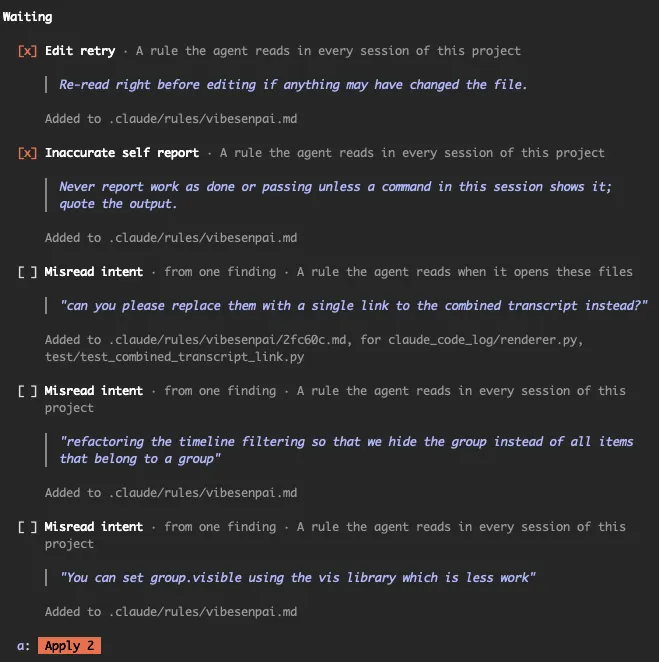
Waiting lists every fix on offer in this project that is not in effect yet. Each shows what
it is for (For overreach, from 3 findings in 2 sessions.), the change, and where it lands.
Tick several and press Apply N (or a), where N is how many you ticked, to draft them as
one request.

Applied lists each fix in effect in this project, newest first, with how often its kind of finding happened before and since:
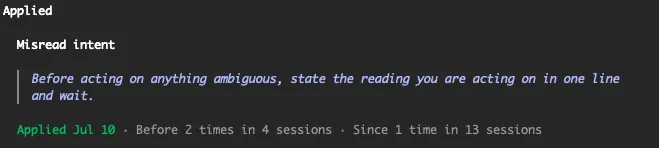
These are counts, not rates. Fixes and Apply says which sessions each count covers.
Health tab
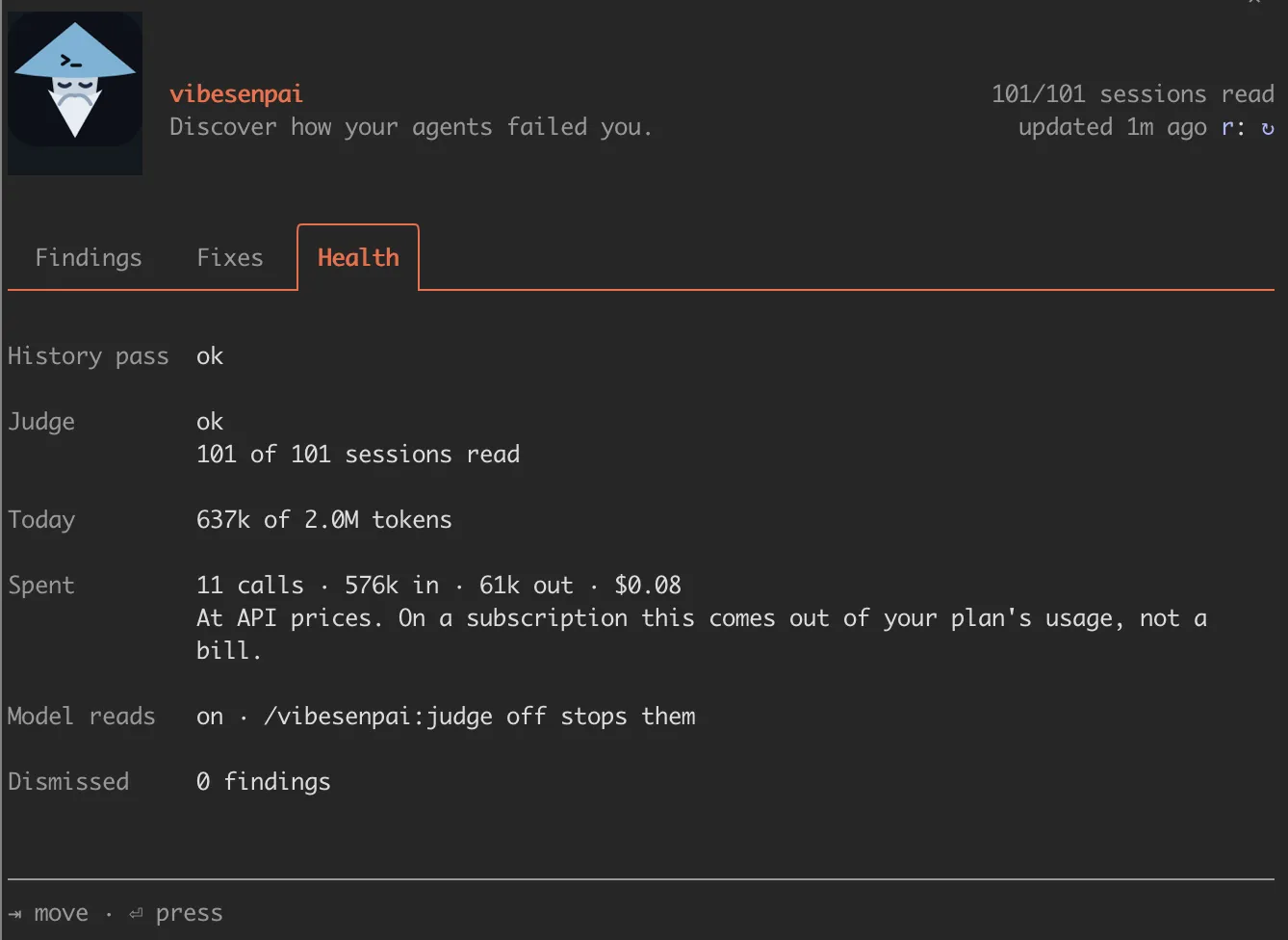
| row | what |
|---|---|
| History pass | the job that runs the free checks: ok, running, retrying · <reason> or not run yet |
| Judge | the job that does the model reads, in the same words or held · <reason>, and N of M sessions read |
| Today | tokens used today against the daily limit, as N of 2.0M tokens |
| Spent | all model reads so far: calls, tokens in and out, and dollars |
| Older | past sessions the model reads skip. The first time, they read your 200 most recent past sessions (the catch-up); older ones are not read automatically |
| Model reads | on or off, with the command that changes it |
| Dismissed | how many findings are hidden, with Restore all |
The dollar figure is Claude Code’s own, at API prices. On a subscription it is plan usage, not a bill.