
Fixes and Apply
A fix is a change for the agent, built from a finding. This page lists the kinds of fix, what Apply does, and how you see whether a fix held.
vibesenpai never writes your files itself, and never sends a prompt. Apply drafts a request into your prompt box. You press Enter, and the agent makes the change under Claude Code’s own permission prompt.
The pane shows findings from all your projects. A fix always lands in the project you are in.
Kinds of fix
| kind | what it is | where it lands |
|---|---|---|
| Rule | a line the agent reads in every session of this project | .claude/rules/vibesenpai.md, plus one pointer line in CLAUDE.md |
| Scoped rule | a rule the agent reads only when it opens certain files | .claude/rules/vibesenpai/<id>.md |
| Permission prompt | Claude Code asks you before a command runs, such as Bash(git push *) | permissions.ask in .claude/settings.local.json |
| Guard | Claude Code refuses an edit to one path outside the project and tells the agent why | a PreToolUse hook in .claude/settings.local.json |
| Test | a test or check that fails when the rule is broken. The agent shows it to you first | in the project |
| Read-only helper | a helper agent that can only read, for when questions got answered with edits | .claude/agents/ask.md |
| Stop-hook check | a check that runs each time the agent finishes a turn | printed only, with no Apply |
A rule goes to its own file. CLAUDE.md gains at most this one line:
- Rules learned from your own sessions: .claude/rules/vibesenpai.mdA Stop hook has no Apply: it needs your paths or test command filled in, and an unfinished one would block every turn.
A prompt for one session has no Apply either. It is printed in the HTML report only.
Which fix a finding shows
- Its own fix, if it has one (only model findings have their own fix). This is built from the finding’s evidence. For example, a command you said not to run becomes a permission prompt for that command, and a write outside the project becomes a guard on that path. Most findings do not have one. It appears after the next history pass (the background job that runs the free checks and builds these fixes), within about 10 minutes.
- Otherwise, its kind’s fix: one rule for that kind of finding. Some kinds have none. Each kind’s fix is on its page under Dimensions.
A finding from another project shows its kind’s fix. If its kind has none, its own fix is
offered instead, marked Built from a session in <project>. Apply adds it to this project.
What Apply does
-
It checks your prompt box. If you have typed something, it stops and says
Your prompt box has a draft. Clear it, then press Apply again.It never writes over a draft. -
It drafts the request into the box, and says so in the pane:

-
You press Enter. The agent makes the change, under Claude Code’s own permission prompt.
-
A few seconds after that turn ends, the pane says
✓ Fix recorded as applied.If the pane is closed, the next session start records it.
If there is no prompt box, the request goes to your clipboard. If that fails too, the pane shows the request for you to copy.
On the Fixes tab you can tick several fixes and apply them as one request.
What the request looks like
For a misread-intent rule, as drafted into the prompt box:

Every request ends with a marker, (vibesenpai fix <id>). When the history pass sees that
marker in a prompt you sent, the fix counts as applied in that project. No button marks a fix
applied. The id comes from what the fix is for, not its wording, so a reworded fix keeps its
history.
When a fix is in effect
| state | means |
|---|---|
| Waiting | on offer in this project, not in effect yet |
| Requested, not in effect yet | the request was seen, but the rule has not been seen loaded |
| Applied | a rule: Claude Code has loaded it in a session. Any other fix: you sent the request |
Claude Code loads rules only when a session starts or after /compact. So a rule counts from
the first time it is seen loaded, not from when you asked for it. A rule that never loads may
have been declined at the permission prompt; it stays on offer with Apply again.
Before and Since
Each applied fix shows how often its finding happened in this project before and since. For example:
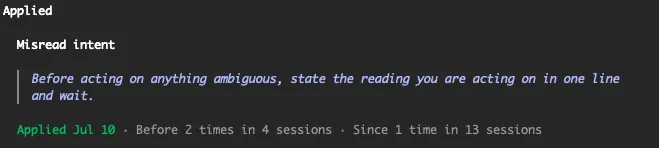
- These are counts in one project, never rates.
- Neither count includes the session you applied it in, or a session where the rule loaded part-way through.
- For a kind the model reads find, only sessions the model has read are counted.
- A finding’s own fix counts only its own case (the same command, the same path). Otherwise every finding of the kind is counted.