
Your first finding
This page walks through one real finding as the pane shows it, part by part, and what each of your answers to it does. A finding says where to look and why; whether it is right is yours to decide.
The example is from the public test data of claude-code-log (MIT).
The row

- The kind comes first, with how often it happened: here, misread intent, 3 times in 2 sessions.
- Each finding under it is headed by the words it is about, cut to fit. Here they are the developer’s own: “You can set group.visible using the vis library which is less work”.
- Under the words: the date, the session and the time.
The turns

Opening the finding shows the turns around the cited one, read from the transcript where Claude Code keeps it. The cited turn is marked ▶. Each agent turn says how many tool calls it made and how many failed.
Show conversation opens those messages in full. More around this adds three messages on each side.
Why

Why is the model’s one-line account of what went wrong.
How to read it
The turns are the evidence; Why only summarises them. Here:
- The developer asked to hide a timeline group, not every item in it.
- The agent started hiding the items one by one.
- The developer interrupted, pointing at the library’s
group.visible. - The agent agreed and switched.
The developer had to correct the course. A model finding can be wrong: if the turns do not bear it out, press Finding is wrong.
The fix
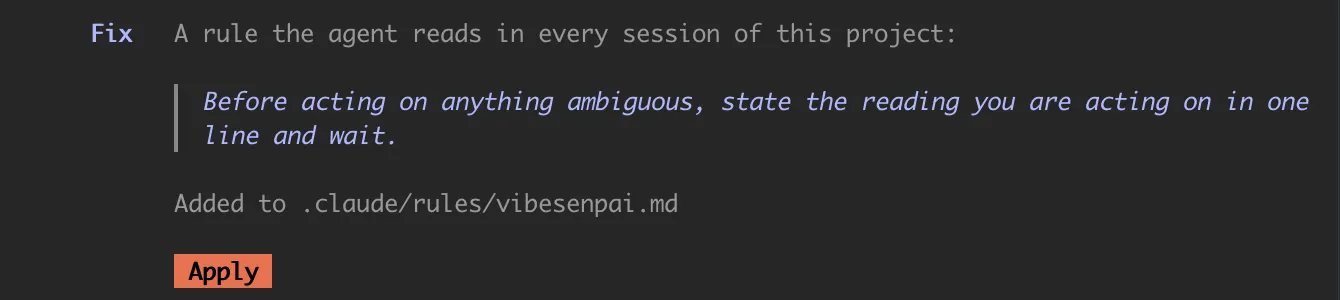
Each finding offers a change for your agent, with what kind of change it is, its exact text, and where it lands. Apply drafts it into your prompt box; your Enter is the yes. Fixes and Apply has the details.
Your answers

| answer | use it when |
|---|---|
| Finding is wrong | it did not happen as described |
| Not the agent’s fault | it happened, but it was not the agent’s mistake |
| Hide | you have seen it |
All three hide the finding and take it out of the pane’s counts, Before and Since included. Your answer is kept as a record of what you said. With no answer, the finding stands and its fix stays on offer.
Not the agent’s fault is offered only when the cited words are your own, as here. When they are the agent’s, only Finding is wrong and Hide are shown.
Each answer takes effect at once and offers Undo. Nothing is deleted: Restore all on the Health tab brings hidden findings back.
When nothing is flagged
If nothing has been found, the Findings tab says so, with how many sessions were read:
Nothing flagged in 40 sessions read.That is a result. The checks ran over those sessions and found nothing they could tie to a turn. Nothing is added to fill the pane.
Across your history
Open full report at the bottom of the Findings tab, or
/vibesenpai:report, writes every finding in your history to
one HTML file.